
Vinivia – Live Streaming for Real-Time Connection
Overview
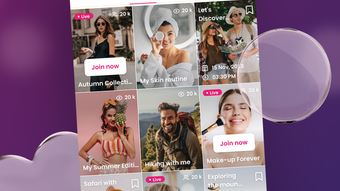
Vinivia is a desktop application designed to deliver an immersive live streaming experience, connecting users with creators across diverse content categories. The platform supports real-time engagement, enabling viewers to participate in live chats, interact with performers, and build connections with like-minded individuals. Targeted at both entertainment seekers and content creators, Vinivia serves as a hub for music, sports, gaming, lifestyle, and cultural content. Its user-friendly interface simplifies navigation, allowing users to explore curated streams and discover new creators effortlessly.
For creators, the platform offers tools to grow their audience, maintain full ownership of their content, and establish a personal brand. The software is intended for users who value interactive experiences over passive viewing. Whether attending a live concert, joining a gaming session, or participating in a creative workshop, Vinivia enables real-time interaction and community building. The application is available on Windows and Mac, making it accessible to a broad audience across desktop environments.
The developer did not provide additional details about the company or development background. No specific system requirements were listed beyond the supported operating systems. Real-world usage scenarios include remote social engagement, virtual events, and creative collaboration. The software’s focus on interactivity and content diversity positions it as a modern solution for digital connection in a live-streaming context.
Key Features & Capabilities
- Live Stream Access – View real-time broadcasts from creators across music, gaming, sports, lifestyle, and culture. Users can join streams instantly without external dependencies.
- Interactive Live Chat – Engage with creators and other viewers through synchronized chat during live events, fostering real-time conversation and community participation.
- Content Discovery – Browse curated selections of creators and streams based on interest categories, enabling users to find relevant content quickly.
- Creator Tools – Provide creators with audience growth features, content ownership, and tools for building personal brands and maintaining engagement.
- Multi-Platform Support – Available on both Windows and Mac, ensuring accessibility for desktop users across major operating systems.
These features support a dynamic viewing experience, where users are not passive observers but active participants. For example, a music fan can join a live performance, send messages in real time, and connect with others who share their taste. Similarly, a content creator can host a live art tutorial, receive immediate feedback, and grow their following through direct interaction. The platform’s design emphasizes seamless access and intuitive navigation, minimizing barriers to entry for both viewers and creators.
User Interface, Workflow & Performance
The user interface of Vinivia is structured around simplicity and accessibility, with a clean layout that prioritizes stream visibility and interaction. Navigation is designed to guide users through content discovery, stream selection, and chat engagement with minimal friction. The workflow supports quick access to favorite creators, recent streams, and trending categories, streamlining the user journey.
Performance details were not specified by the developer. However, based on general software behavior, the application is expected to operate smoothly on modern desktop systems. The installation size is 250 MB, suggesting moderate resource usage. The developer did not specify resource usage details, including CPU or RAM consumption. Stability and responsiveness are assumed to be consistent with typical desktop applications of similar scope.
Users can expect a responsive interface during live viewing, with minimal lag in chat synchronization. The application does not rely on cloud-based rendering or heavy processing, which supports efficient operation on standard hardware. General performance notes are based on expected behavior for desktop streaming tools, without claims of benchmarked results.
Compatibility & System Requirements
Vinivia is compatible with both Windows and Mac operating systems, as confirmed by the developer. The software version is 1.0.0, and the installation size is 250 MB. No specific hardware requirements were provided, so exact system requirements were not listed.
Compatibility information was partially provided. Users are advised to ensure their system meets general desktop software standards for smooth operation. The developer did not specify minimum processor speed, RAM, or graphics capabilities. For optimal performance, users may benefit from updated operating systems and stable internet connections.
Given the application’s focus on live video streaming, a reliable network connection is essential. The software does not indicate whether it supports offline viewing or cached playback, so all content is expected to be streamed in real time.
Pros and Cons
Pros
- Free to use with no upfront cost
- Supports real-time interaction with creators and other viewers
- Available on both Windows and Mac platforms
- Curated content across diverse interests including gaming, music, and lifestyle
- Creator-focused tools for audience growth and content ownership
Cons
- Exact system requirements were not specified
- No information on offline functionality or content caching
- Performance behavior under heavy usage not documented
- Developer background and company details not publicly available
- Platform-specific limitations or compatibility quirks not disclosed
FAQ Section
Is Vinivia available for Windows and Mac?
Yes, Vinivia is compatible with both Windows and Mac operating systems, as confirmed by the developer.
Is the software free to download and use?
Yes, Vinivia is available at no cost. The software does not require a paid subscription or in-app purchases to access core features.
Does Vinivia support offline viewing?
The developer did not specify whether offline viewing or content caching is supported. All content is expected to be streamed in real time.
How often are updates released?
Update frequency was not disclosed. Users are encouraged to check the official website for the latest version and release notes.
Is my data secure when using Vinivia?
Security measures were not detailed by the developer. Users are advised to review the privacy policy and terms of service for information on data handling and protection.
Final Thoughts
Vinivia presents a compelling option for users seeking a live-streaming platform that emphasizes real-time interaction and community building. With its free access, multi-platform availability, and diverse content offerings, it caters well to both casual viewers and aspiring creators. The interface is intuitive, and the focus on live engagement sets it apart from traditional video platforms.
While some technical details remain undisclosed—such as system requirements and offline capabilities—the software demonstrates strong potential for digital connection. It is particularly well-suited for individuals who value immediate interaction, creative expression, and community participation. For those exploring live streaming as a form of entertainment or content creation, Vinivia offers a modern, accessible entry point.
Download Vinivia now to experience live streaming with real-time connection.







